
When calculating the cost of sheet metal parts, laser cutting is rarely the only operation involved. In real production, most parts also require bending, engraving, painting, or other post-processing steps.
CUTL allows you to automatically calculate bending and additional operations directly from a DXF drawing, eliminating manual work and reducing pricing errors.
In this article, we’ll explain how automatic bending cost calculation works in CUTL and how to prepare your drawings correctly.
Why Bending Must Be Included in Cost Calculation
In previous articles, we described:
- Basic part cost calculation
- Cost calculation for multiple parts with manually added operations
However, in sheet metal fabrication:
- One part can include multiple bends
- The price of bending often depends on bend length
- Manual calculation does not scale and leads to mistakes
CUTL solves this by reading line types and colors directly from DXF files and automatically adding bending operations to the quote.
Example: From Simple Parts to Sheet Metal Boxes
A simple flat part only requires laser cutting.
But let’s look at a more realistic example — a sheet metal box.
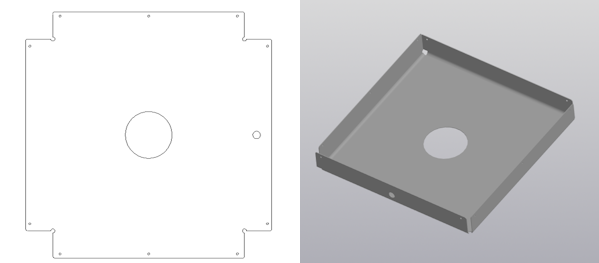
Manufacturing steps:
- Laser cutting
- 4 bending operations
To calculate the real cost of such a part, bending must be included automatically.
How Automatic Bending Calculation Works in CUTL
Step 1: Create a Bending Operation
Go to:
Dictionaries → Operations
Create an operation called Bending and define its price.
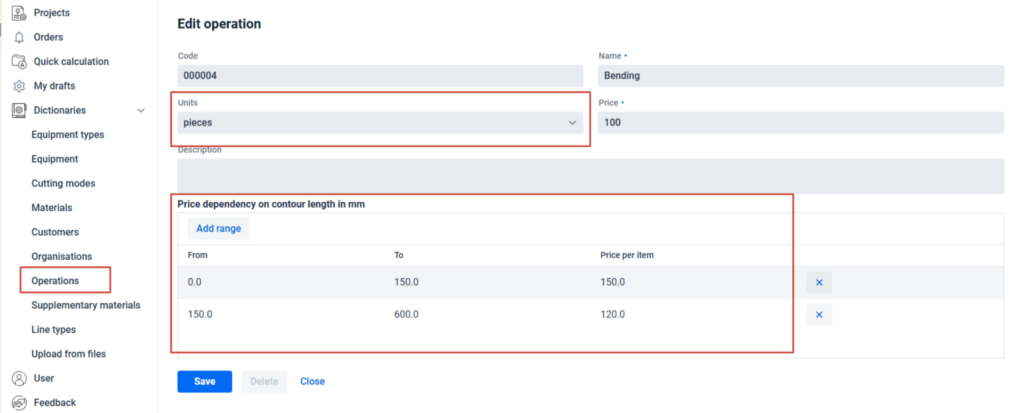
Length-based pricing logic
Bending cost often depends on bend length, so CUTL supports price ranges:
- Operation unit: Pieces
- Price per bend defined by length ranges
- If the bend length does not match any range, the base price is applied
This makes bending cost calculation flexible and production-ready.
Step 2: Define Line Types for Bending
Go to:
Dictionaries → Line Types
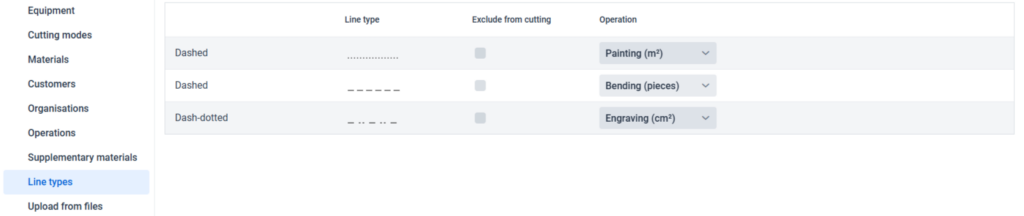
CUTL automatically detects four DXF line types:
- Continuous (default cutting line)
- Dashed
- Dash-dot
- Dotted
By default, all DXF lines are treated as cutting lines.
You can:
- Assign a specific line type to bending
- Mark bending lines as Excluded from cutting
When excluded:
- Bending lines do not contribute to cutting length
- They are used only for bending cost calculation
Step 3: Mark Bend Lines in the DXF Drawing
To enable automatic detection:
- Bend lines must be marked by line type or color
- Support depends on the CAD software used
Most DXF editors correctly export line colors.
Some editors also export explicit line type names.
For example:
- CUTL’s built-in CAD editor exports dashed lines correctly
- SOLIDWORKS bending lines are recognized as dash-dot
Automatic Bending Cost Calculation Result
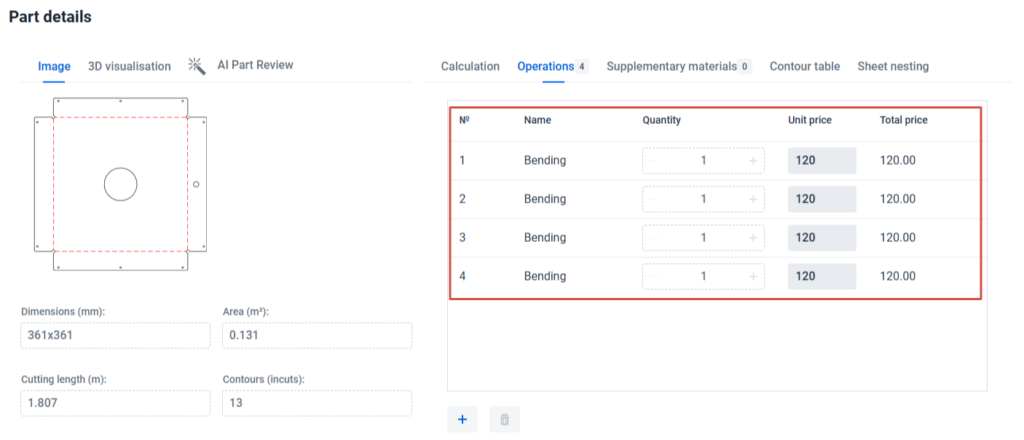
After DXF analysis in CUTL:
- Bend lines are automatically detected
- Bending operations are added to the calculation
- Cutting length excludes bending lines
Example result:
- Bend length: 150–600 mm
- Bending price applied: 120 EUR
- No manual adjustments required
Adding Other Operations: Engraving Example
The same logic works for engraving.
Example:
A central contour is not a cutout, but an engraved logo.
- Mark the contour with a dash-dot line

- Create an Engraving operation

- Set price: 3 EUR per cm²
- Assign dash-dot lines to engraving
- Exclude them from cutting
After analysis, CUTL automatically adds engraving to the quote.
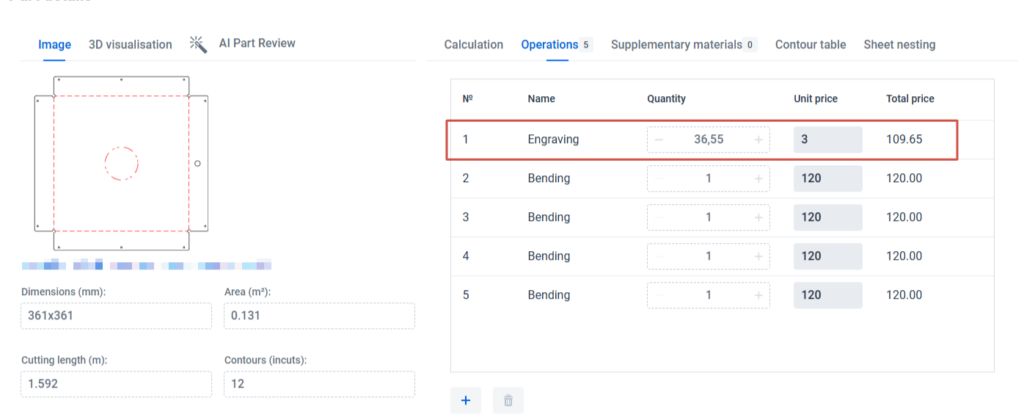
Area-based operations
For operations measured in:
- mm²
- cm²
- m²
CUTL automatically uses the area of a closed contour as the operation quantity.
Painting and Surface Treatment Calculation
Painting can also be calculated automatically.
How it works:
- Use a dotted line for the outer contour

- Do not exclude it from cutting
Result:
- Cutting is calculated normally
- The same contour area is used for painting cost
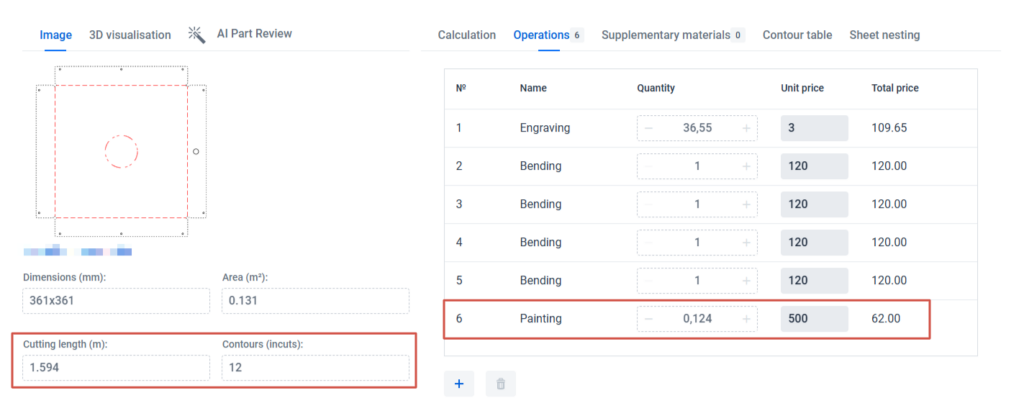
This allows one contour to drive multiple operations.
Supported DXF Line Type and Color Mapping
Automatic operation detection works only if the DXF file contains:
- Line color information
- Or line type metadata
CAD software support:
- Most editors export line colors
- SOLIDWORKS bending lines → dash-dot
- CUTL applies internal mapping for both color and line type
Conclusion
By using different line types and colors in DXF drawings, CUTL enables:
- Automatic bending cost calculation
- Accurate engraving and painting pricing
- Correct cutting length calculation
- Zero manual operation setup per part
This approach scales perfectly for production workflows and eliminates human error in sheet metal cost estimation.
CUTL turns DXF drawings into accurate, production-ready quotes — automatically.
Keywords: sheet metal bending cost calculation, laser cutting pricing software, DXF bending lines, automatic bend calculation, sheet metal quotation software, CUTL