Skip to content
HomeQuotingSTEP assembly quoting
CUTL Quoting

Quote the whole product, straight from its STEP assembly

CUTL reads the assembly tree, suggests what to make and what to buy, and prices every line from your own rates. Add supplier prices, labour and markup, then send one quote for the whole product.
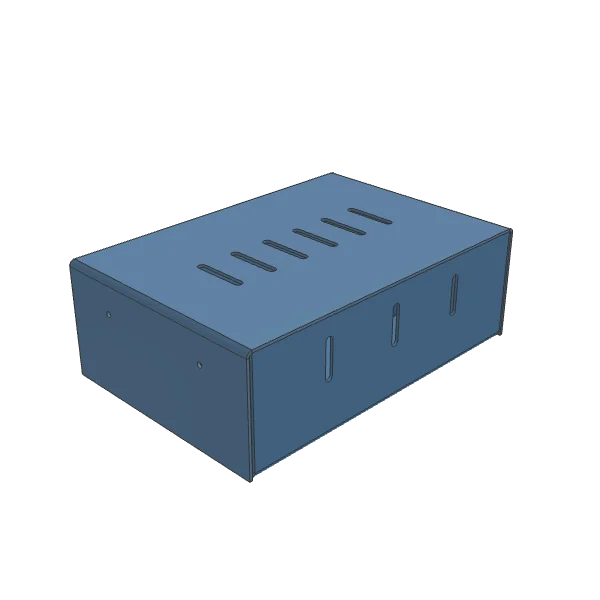
3D model of the assembly
korpus_k12.stepDrag to rotate

One STEP model, one assembly quote

The assembly above, quoted line by line: parts you make are priced from their flat patterns, purchased items and assembly work are added. Example rates, change them to yours.

Enclosure K-12
ItemQtyUnitTotal
BaseS235 · 2 mm · cut, 2 bends, coat
Make1$4.64$4.64
CoverS235 · 2 mm · cut, 2 bends, coat
Make1$4.41$4.41
Mounting panelS235 · 2 mm · cut, coat
Make1$0.89$0.89
BracketS235 · 2 mm · cut, 1 bend, coat
Make2$0.69$1.38
Screws and nuts M5Purchased item, supplier price
Buy8$0.15$1.20
Assembly6 min at $40.00 per hour
Labour1$4.00$4.00
Price per assembly$16.52
5 parts made, 1 purchased item, assembly work. Example rates.

Customers send assemblies, not flat parts

A frame or a cabinet arrives as one STEP model, with brackets you cut, fasteners you buy and sub-assemblies you weld. Every one of them needs a price before the customer gets a quote.

Every item sorted by hand

Someone walks the model line by line and decides what the shop makes and what it buys in. Only then can pricing start.

Supplier prices in the inbox

Bought items need prices from suppliers. They come back by email and phone, and someone copies them into a spreadsheet.

Labour and setup get guessed

Welding, assembly and painting are hard to cost per product. Setup time on a small order is easy to forget, and the margin pays for it.

From STEP assembly to customer quote

Everything a product quote needs

Parts you make, items you buy and the labour that puts them together, priced in one place and kept with the model.

Buy or make, suggested
Standard parts such as bolts and nuts are marked Buy. Your own-part prefixes and sheet or tube geometry are marked Make. Anything unclear is flagged for you to check.
Parts priced from your rates
Sheet and tube parts are laser-priced from your materials and cutting modes, like any project part, plus the operations of their route. Other shapes take the sum of their operations or a price you type.
Supplier price links
Send a supplier a link for one bought item. They open it without an account, see only that item in 3D and enter a price, a lead time and a comment. The price lands on the item.
Labour on every sub-assembly
Add assembly operations with setup and per-piece minutes. The rate comes from the equipment. Setup is shared over the order, so larger orders cost less per product.
Quantity breaks, markup and margin
Save up to three quote quantities and see the cost by batch size. One markup gives the selling price per product, the margin and the lead time from your slowest supplier.
Quotes, lists and ERP export
The customer quote shows selling prices only, as PDF or Excel. Your team gets an internal cost sheet, purchase and manufacturing lists, assembly station kits and an ERP export.

Built for shops that quote whole products

Sheet-metal job shops

Your customers send frames, cabinets and enclosures as STEP assemblies. Quote the cut parts, the bought parts and the welding in one go.

Estimators and sales teams

Build one quote with buy and make, labour and markup, and keep it in step when the customer sends a new version of the model.

Purchasing and production

Get purchase lists, manufacturing lists and assembly station kits for the number of products you quote, ready as CSV.

Questions about STEP assembly quoting

You need a CUTL account, and a new account gets 10,000 coins free. A STEP model in your account costs 200 coins for an assembly. Each laser-cut part sent for calculation costs 100 coins, refunded if the calculation fails. Starting the quotation, supplier links and downloads are free.
No. The quote for the customer shows selling prices only, never cost, markup or margin. The markup is spread over the rows in proportion to their cost, so the rows add up to the selling price. Only members of your team see the quotation itself.
No. The supplier opens the link on a phone or a computer without an account. They see only that one item, with its quantity, size and a 3D view, never the rest of your assembly or your other prices. CUTL sends no email: you share the link yourself.
Upload the new STEP file and CUTL compares it with the quotation. Your decisions stay on everything that did not change. Changed, redrawn and removed items are marked, and you accept them row by row or all at once.
A quotation holds up to 5,000 items. Sub-assemblies deeper than three levels are flattened, and their parts are listed one level up. Single-part models are priced with CUTL Quoting instead.

Quote the whole product, straight from its STEP assembly

CUTL reads the assembly tree, suggests what to make and what to buy, and prices every line from your own rates. Add supplier prices, labour and markup, then send one quote for the whole product.

Quote an assembly